
Whether you're writing your first short film or your tenth feature, proper screenplay formatting is non-negotiable. Readers, producers, and agents expect a specific format, and deviating from it signals inexperience before they've read a single line of dialogue.
This guide covers everything you need to know about industry-standard screenplay format.
Why Formatting Matters
A properly formatted screenplay serves two purposes:
- Readability. Industry readers process hundreds of scripts. Standard formatting lets them focus on your story, not your layout.
- Timing. One properly formatted page equals roughly one minute of screen time. This convention helps everyone estimate runtime at a glance.
The Core Elements
Scene Heading (Slugline)
Every new scene starts with a scene heading that tells us three things: interior or exterior, the location, and the time of day.
INT. COFFEE SHOP - DAY

EXT. PARKING LOT - NIGHT

INT./EXT. CAR (MOVING) - CONTINUOUS
Look at how John August handles it in Big Fish:
INT. WILL'S BEDROOM - NIGHT (1973)

EXT. CAMPFIRE - NIGHT (1977)

INT. BLOOM FRONT HALL - NIGHT (1987)
Notice how the year in parentheses tells us we're jumping through time without needing a "SUPER:" or title card.
Rules:
- Always capitalized
- Use INT. or EXT. (or INT./EXT. for both)
- Location and time separated by a hyphen
- Keep locations consistent (don't switch between "COFFEE SHOP" and "CAFE" for the same place)
Action Lines
Action describes what we see and hear on screen. Write in present tense, be visual, and keep it lean.
Here's a great example from Big Fish:
WILL BLOOM, AGE 3, listens wide-eyed as his father
EDWARD BLOOM, 40's and handsome, tells the story.
In every gesture, Edward is bigger than life,
describing each detail with absolute conviction.
In just three lines, we know the characters, the dynamic, and the tone of the entire film.
Tips:
- Present tense, always ("walks" not "walked")
- Only describe what the camera can capture, no internal thoughts
- Break long paragraphs into 3-4 line chunks for readability
- Introduce characters in CAPS the first time they appear
Character Name
Centered above dialogue, always in caps.
                    EDWARD
          I didn't put any stock into such
          speculation or superstition.
Dialogue
The words a character speaks, indented beneath their name.
Keep it tight. Real people don't speak in complete sentences or monologues. Every line should either reveal character, advance the plot, or ideally both.
Look at this exchange from Big Fish:
                    LITTLE BRAVE
                  (confused)
          Your finger?

                    EDWARD
          Gold.
One word. That's all Edward needs. It gets a laugh, reveals his showmanship, and moves the story forward.
Parenthetical
A brief direction within dialogue, used sparingly.
                    WILL
                  (low but insistent)
          Make him stop.
Use parentheticals only when the delivery isn't obvious from context. If the line reads clearly without it, skip it.
Transition
Transitions like CUT TO: or DISSOLVE TO: are mostly outdated. Modern screenplays rarely use them since the scene heading change implies a cut. Use SMASH CUT TO: or MATCH CUT TO: only when the transition itself is part of the storytelling.
Page Layout Specifications
| Element | Left Margin | Right Margin |
|---|---|---|
| Scene Heading | 1.5" | 1" |
| Action | 1.5" | 1" |
| Character Name | 3.7" | N/A |
| Dialogue | 2.5" | 2.5" |
| Parenthetical | 3.1" | 2.5" |
| Transition | N/A | 1" (right-aligned) |
Page setup: Courier 12pt, printed on US Letter (8.5" x 11").
Common Formatting Mistakes
- Camera directions. In general, leave shot choices like "CLOSE UP ON" or "PAN TO" to the director. Readers want to experience the story, not read a shot list. If you need a specific shot for storytelling purposes, weave it into the action instead.
- Walls of text. Break action into short, punchy paragraphs. White space is your friend.
- Overusing parentheticals. Trust your actors. If the emotion is clear from the line, you don't need (angrily).
- Inconsistent character names. Pick one name and stick with it. Don't switch between SARAH, MS. CHEN, and MOM.
Formatting Your Screenplay with plotwell
You don't need to memorize margin widths or wrestle with tab stops. plotwell's script editor handles all formatting automatically:
- Auto-format as you type. Hit Enter after a scene heading and it switches to action. Type a character name and it knows dialogue comes next.
- Smart element detection. Type "INT." and plotwell recognizes it as a scene heading instantly.
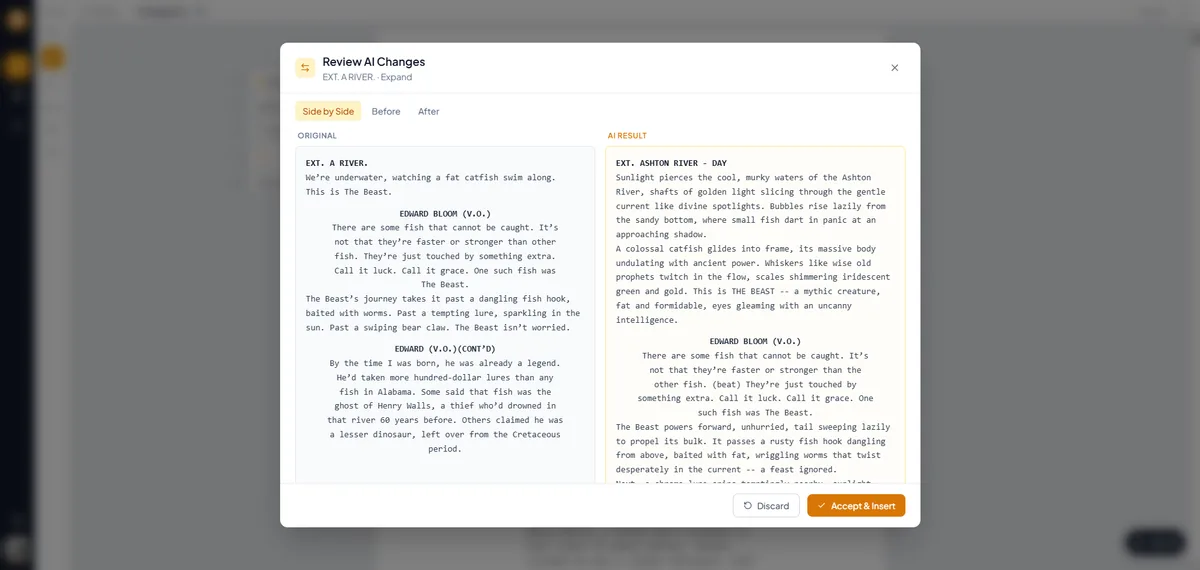
- AI inline autocomplete. As you write, the AI suggests completions for your dialogue, action lines, and scene descriptions. It understands screenplay format and your project's tone, so suggestions feel natural rather than generic. Accept with a keystroke or keep typing to ignore.
- AI scene generation. Describe what should happen in a scene and let the AI write a first draft in proper screenplay format. You get correctly formatted scene headings, action, character names, and dialogue ready for you to refine.
- Import existing scripts. Bring in scripts from Final Draft (.fdx) or Fountain (.fountain) files. plotwell parses them and applies proper formatting automatically.
- Export to industry-standard PDF. One click generates a perfectly formatted PDF with proper margins, Courier font, and page numbers. Add a professional cover page with title, author, and contact info.
- Scene numbering. Toggle scene numbers on for production drafts without manually numbering anything.
- Real-time collaboration. Multiple writers can work on the same script simultaneously with live cursors and presence tracking. Formatting stays consistent no matter who's typing.
The editor lets you focus on writing while it handles the formatting rules behind the scenes.
Quick Reference Cheat Sheet
- Scene Heading: INT./EXT. LOCATION - TIME (all caps)
- Action: Present tense, visual, 3-4 lines max per block
- Character: ALL CAPS, centered above dialogue
- Dialogue: Indented, natural speech patterns
- Parenthetical: Minimal, only when not obvious
- Transition: Rarely needed, right-aligned
What's Next?
Formatting is the foundation. Now fill it with a great story. If you're starting from scratch, try outlining your scenes with a beat sheet before writing full pages. It helps you find structural problems early, before you've invested weeks in draft one.